This is one full chapter from the Modern Time Management e-course. The course includes 40 practical chapters across six modules.
Your time is rarely lost because of one major mistake. It is usually consumed by dozens of small decisions, interruptions, messages, meetings, and tasks that pull attention away from more important work. Effective time management is not simply about doing more — it is about making more deliberate choices about where to invest your time, attention, and energy.
Chapter 35: AI as a Productivity Partner
Artificial intelligence can save time, reduce routine work, accelerate thinking, and make difficult tasks easier to start.
It can also waste time.
You can spend twenty minutes improving a prompt for a task you could have completed yourself in ten. You can generate five versions of a document and then spend an hour deciding which one is best. You can receive a confident answer that looks useful but contains important errors.
AI therefore does not automatically create productivity.
Productivity comes from assigning the right part of the work to AI while keeping the right part under human control.
The objective is not to use AI as often as possible.
The objective is to use it where it reduces the total amount of time, attention, and effort required to produce a good result.
Think of AI as a Collaborator, Not an Autopilot
A useful mental model is to treat AI as a very fast collaborator that can generate, reorganize, compare, explain, transform, and suggest.
But speed is not the same as judgment.
You remain responsible for deciding:
- what problem should be solved;
- what outcome is needed;
- which information is trustworthy;
- which constraints matter;
- whether the result is good enough;
- what should actually be done.
AI is particularly useful between intention and execution.
You know what you need. AI helps you move toward it faster.
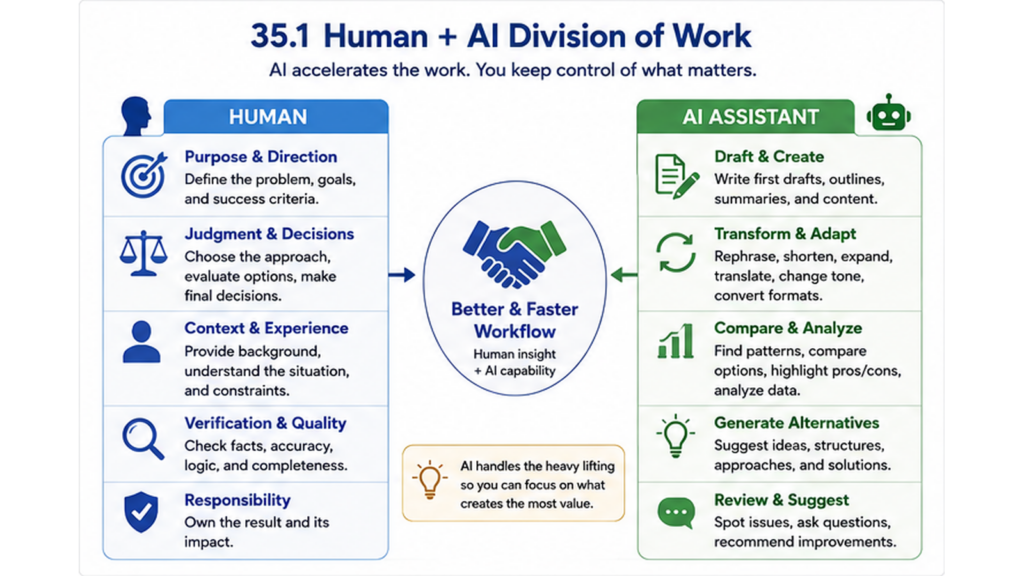
This leads to a simple division:
Human: purpose, judgment, responsibility.
AI: acceleration, alternatives, transformation, support.
Where AI Can Save Time
AI can support many knowledge-work tasks, but several categories are especially useful.
1. Getting Started
The blank page often creates more resistance than the second draft.
AI can help generate:
- a first outline;
- possible headings;
- questions to consider;
- alternative approaches;
- a preliminary structure;
- a rough first draft.
The first output does not need to be excellent.
Its purpose may simply be to give you something concrete to improve.
2. Transforming Existing Material
AI is often useful when the source material already exists and the task is to change its form.
For example:
- turn notes into a structured summary;
- shorten a long text;
- rewrite technical language for a non-specialist audience;
- convert information into a checklist;
- turn meeting notes into action items;
- change a long explanation into presentation points;
- translate or adapt a draft for another audience.
These tasks can produce substantial time savings because AI does not need to invent the core information from nothing.
3. Generating Alternatives
AI can rapidly generate multiple options when you would otherwise spend time staring at one idea.
You might ask for:
- ten possible titles;
- three ways to structure a presentation;
- alternative explanations;
- arguments for and against an idea;
- possible risks;
- questions a customer might ask;
- different ways to solve a scheduling problem.
You still choose the useful options.
AI expands the option set; it does not eliminate the need to decide.
4. Reviewing Your Work
AI can act as a second reader.
You can ask it to identify:
- unclear passages;
- possible contradictions;
- missing steps;
- repetition;
- weak arguments;
- questions a skeptical reader might ask;
- areas that require verification.
This does not mean every criticism will be correct.
But reviewing a list of possible weaknesses is often faster than trying to see every problem in your own work without assistance.
Use AI Where Verification Is Cheap
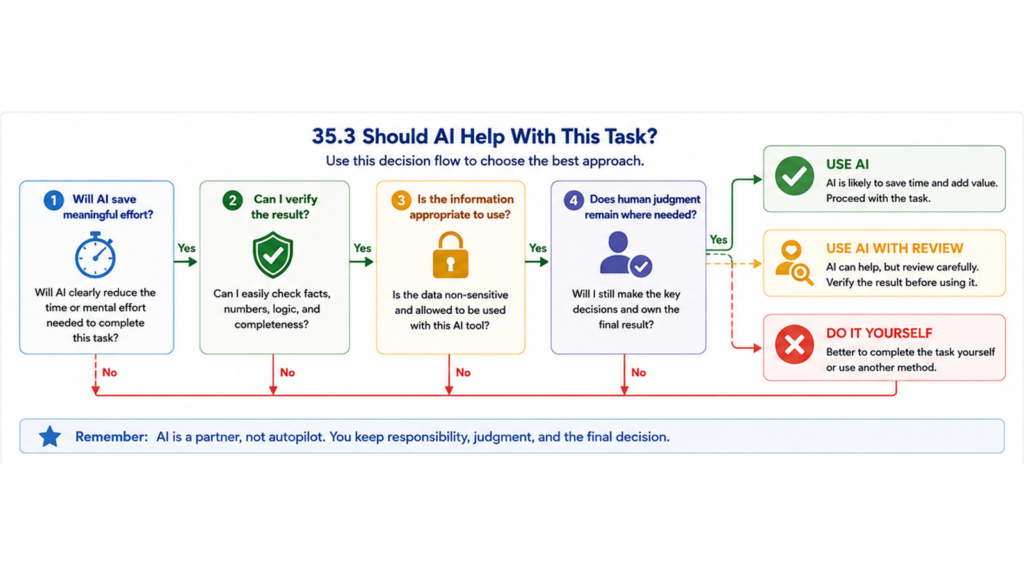
One of the most useful questions in deciding whether to use AI is:
How easy will it be to check the output?
AI is especially attractive when:
- the task would take you considerable time;
- AI can produce a useful first version quickly;
- you can verify the result easily;
- errors would be visible before they create serious consequences.
For example, asking AI to reorganize your own meeting notes is relatively easy to verify because you know what the meeting contained.
Asking AI for a factual answer in a field you do not understand may be much harder to verify.
If checking the answer requires more expertise and time than producing the answer yourself, the apparent productivity gain may disappear.
Example 35.1 — The Meeting Follow-Up
Sara finishes a 50-minute project meeting with two pages of rough notes.
Normally she spends another twenty minutes writing a follow-up message.
This time she gives her notes to an approved AI tool and asks it to produce:
- a three-sentence summary;
- decisions made;
- action items;
- owners;
- deadlines;
- unresolved questions.
The draft appears in seconds.
Sara compares it with her notes, corrects one owner and one deadline, and sends the result.
The important productivity gain did not come from allowing AI to decide what happened in the meeting.
It came from automating the transformation of information Sara already understood.
Give AI a Clear Job
Vague requests often produce vague outputs.
Compare:
“Improve this.”
with:
“Rewrite this email so that the purpose is clear in the first sentence, keep it under 150 words, preserve all dates and figures exactly, and finish with one clear call to action.”
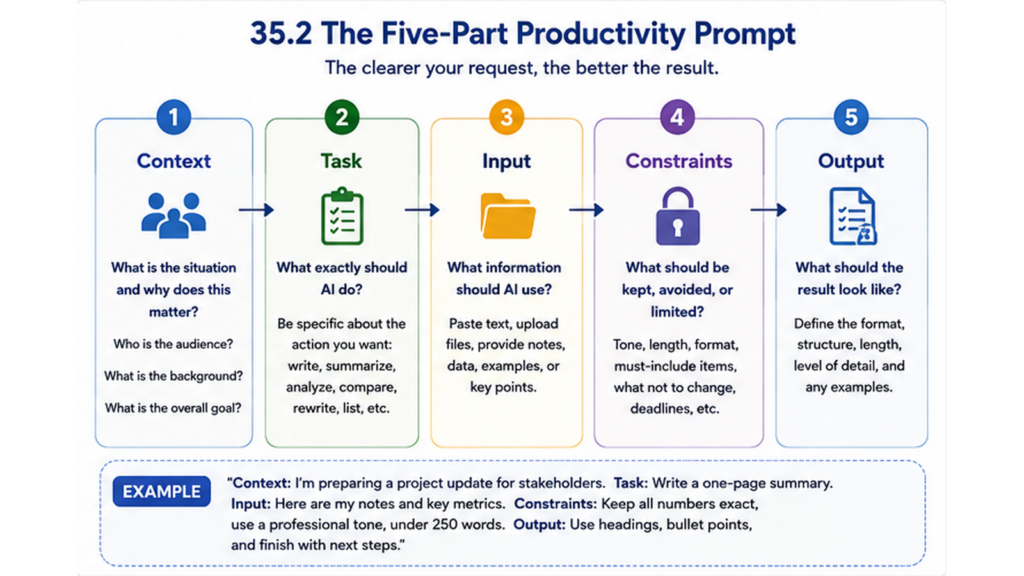
A practical prompt can contain five elements.
- Context: What situation is this?
- Task: What do you want AI to do?
- Input: What material should it work from?
- Constraints: What must it preserve, avoid, or limit?
- Output: What should the result look like?
You do not need a complicated formula for every small request.
But when the output matters, better instructions reduce unnecessary iterations.
Provide the Right Context—Not Every Possible Detail
AI cannot reliably infer information that you have not provided.
If you ask:
“Write a reply to this customer,”
the result depends on whether AI knows:
- what the customer asked;
- your desired outcome;
- your policy;
- your preferred tone;
- what you are allowed to promise.
More context can improve the answer.
But adding unnecessary material can create its own cost.
Give AI the information required for the task, not an uncontrolled dump of everything you possess.
Ask for the Output Format You Need
One of the easiest ways to reduce follow-up work is to specify the format in advance.
Instead of asking for “ideas,” ask for:
- a table with five options and pros and cons;
- a checklist ordered by priority;
- a 200-word summary;
- three alternative subject lines;
- a step-by-step procedure;
- a list of decisions requiring human approval;
- a draft with uncertain claims clearly marked.
The closer the generated format is to the format you actually need, the less transformation work remains for you.
Use AI to Improve the First Pass, Not to Create Endless Versions
AI makes additional drafts extremely cheap.
This can become a trap.
You generate version A.
Then B.
Then a shorter C.
Then a more professional D.
Then you ask for five alternatives to the opening paragraph.
Eventually you have more material than when you started.
Set a stopping rule.
For many ordinary tasks:
- Generate a useful first version.
- Identify the most important problems.
- Request one targeted improvement.
- Finish the work yourself.
AI should shorten the path to completion, not create an infinite path of alternatives.
Use AI for Thinking, Not Only Writing
Using AI only as a text generator leaves much of its productivity value unused.
You can use it as a thinking partner.
For example:
- “What assumptions am I making?”
- “What could go wrong with this plan?”
- “Give me arguments against this recommendation.”
- “What questions should I answer before making this decision?”
- “Which parts of this plan are ambiguous?”
- “What information is missing?”
- “Give me three fundamentally different approaches.”
This can reduce the time needed to discover blind spots and broaden your thinking before you commit to a decision.
But AI-generated criticism is input, not authority.
You decide which objections matter.
Example 35.2 — Ten Minutes Before the Presentation
Daniel has completed a presentation for senior management.
Instead of asking AI to rewrite the slides, he asks:
“Imagine you are a skeptical executive. Based only on this presentation, list the five questions you would be most likely to ask and identify which claims need stronger evidence.”
The response highlights two weak assumptions and one missing cost estimate.
Daniel fixes those issues before the meeting.
AI did not create the presentation.
It helped Daniel direct his remaining preparation time toward the most likely weaknesses.
Never Outsource Verification Automatically
AI can produce incorrect information while sounding confident.
This means that verification must be part of the workflow whenever factual accuracy matters.
Check especially:
- names;
- dates;
- numbers;
- calculations;
- citations and references;
- legal or regulatory claims;
- medical, financial, or safety-related information;
- facts that materially affect a decision.
Do not confuse polished language with verified information.
If an output contains claims that you cannot reasonably verify, ask whether AI is appropriate for that part of the task at all.
Use Source-Grounded Workflows Where Accuracy Matters
When possible, give AI the documents, data, notes, or other material that should form the basis of the answer.
Then make the instruction explicit:
“Use only the information in the supplied material. If the material does not answer the question, say so.”
This is often more reliable than asking for an answer from unspecified background knowledge.
It is particularly useful for:
- summarizing reports;
- extracting requirements;
- comparing versions;
- finding information in long documents;
- creating action lists from source material;
- answering questions about internal documentation.
Protect Confidential and Personal Information
Saving ten minutes is not worthwhile if you create a privacy, security, contractual, or compliance problem.
Before entering information into an AI system, consider:
- Does it contain personal data?
- Does it contain confidential business information?
- Does it contain customer, employee, patient, student, or client information?
- Are you authorized to use this tool for this information?
- Does your organization have an approved AI environment or policy?
Use approved systems and follow the rules that apply to your organization and profession.
When in doubt, remove unnecessary identifying or confidential information rather than assuming it is safe to include.
Know When Not to Use AI
AI is not the best option for every task.
Think carefully before using it when:
- the task takes less time to complete than to explain;
- you cannot verify the output;
- the consequences of an unnoticed error are high;
- the information is confidential and the system is not approved;
- the task requires a personal judgment that you should make yourself;
- learning how to perform the task is itself the objective;
- authentic personal expression matters more than speed;
- you already have a reliable template or process that is faster.
A calculator is useful because you do not need to prove mathematical independence every time you add numbers.
But if you are learning basic mathematics, outsourcing every calculation may defeat the purpose of the exercise.
The same principle applies to AI.
Do not automate away the capability you are trying to develop.
Measure Net Time Saved
Do not measure AI productivity by generation speed.
Measure the entire workflow.
Count:
- time preparing the input;
- time writing the prompt;
- time waiting or interacting;
- time reviewing the result;
- time correcting errors;
- time transferring the output into the final system.
Suppose a task normally takes thirty minutes.
AI generates a draft in twenty seconds.
That does not mean you saved twenty-nine minutes and forty seconds.
If prompting, checking, correcting, and formatting take twenty-five minutes, the actual saving is small.
If the same process takes eight minutes, the saving is meaningful.
Optimize for total completion time, not generation time.
Example 35.3 — The AI Workflow That Was Slower
Michael needs to write a short reply declining a meeting invitation.
He opens an AI tool, explains the situation, asks for three alternatives, chooses one, asks for a warmer version, then asks for a shorter version.
Seven minutes later he has a two-sentence reply.
He realizes he could have written:
“Thanks for the invitation. I won’t be able to join on Thursday, but please send me the key decisions afterwards.”
in less than one minute.
The lesson is not that AI is ineffective.
The lesson is that tool overhead matters.
Save Good Prompts and Workflows
The first time you use AI for a recurring task, you may need several attempts.
If you find an effective approach, do not reinvent it next week.
Save useful:
- prompts;
- templates;
- checklists;
- examples;
- preferred output structures;
- review instructions.
For a recurring monthly report, for example, you might create one reusable instruction that specifies the structure, tone, length, required sections, and verification rules.
The largest productivity gains often appear when a successful AI-assisted method becomes repeatable.
AI Should Free Capacity for Higher-Value Work
Saving time only creates value if something useful happens with the saved capacity.
If AI saves you thirty minutes on administrative work and you automatically fill those thirty minutes with more low-value administration, the broader benefit is limited.
Use reclaimed time deliberately.
It may go toward:
- more important work;
- better preparation;
- customer relationships;
- learning;
- creative thinking;
- problem prevention;
- exercise;
- rest;
- family or personal priorities.
The objective of productivity technology is not automatically to produce more work.
It is to increase your ability to allocate limited time and attention where they create the most value.
Exercise 35.1 — Find Three AI Opportunities
Review your work from the last seven days.
Identify three tasks where AI might reduce time or effort.
For each task, answer:
- How long does the task normally take?
- Which part requires human judgment?
- Which part is repetitive, transformative, or easy to delegate?
- Could AI create a useful first version?
- How would you verify the result?
- What information would you need to provide?
- Is the information appropriate to use with your available AI tool?
Choose only one of the three tasks for your first experiment.
Exercise 35.2 — Build a Reusable Productivity Prompt
Choose a recurring task and create a prompt using the five-part structure.
- Context: What should AI understand about the situation?
- Task: What exactly should it do?
- Input: What information will you provide?
- Constraints: What must remain unchanged or be avoided?
- Output: What exact format do you want?
Test it once.
Then improve the prompt only where the first output revealed a real problem.
Save the final version for future use.
Exercise 35.3 — Measure the Real Time Saving
Take one task you normally perform without AI.
Compare two versions.
Normal workflow:
- Total completion time: ______
AI-assisted workflow:
- Preparing input: ______
- Prompting: ______
- Generating and interacting: ______
- Verification: ______
- Editing and finalizing: ______
- Total: ______
Then ask:
- Did AI actually save time?
- Did quality improve or decline?
- Could the workflow be reused?
- Would a template or non-AI method be faster?
- What will you do with the capacity you saved?
Use AI Deliberately
AI changes an important assumption about productivity.
The question is no longer only:
“How can I perform this task more efficiently?”
You can also ask:
“Which parts of this task still need to be performed by me?”
Use AI to overcome blank pages, transform existing information, generate alternatives, review your thinking, and reduce repetitive knowledge work.
But retain human control over purpose, judgment, sensitive decisions, verification, and responsibility.
Do not measure success by the number of AI tools you use or the number of prompts you write.
Measure whether the complete workflow becomes faster, clearer, easier, or better.
The best use of AI is not to remove the human from the work. It is to remove unnecessary work from the human.
Key Takeaways
- AI is a productivity tool, not an automatic source of productivity.
- Keep purpose, judgment, verification, and responsibility under human control.
- Use AI to accelerate drafting, transformation, comparison, review, and idea generation.
- AI is especially useful when producing the first version is expensive but checking it is relatively easy.
- Give AI a clear job rather than a vague request.
- Useful prompts often include context, task, input, constraints, and desired output.
- Specify the output format when doing so reduces later editing.
- Avoid endless generation of alternative versions.
- Use AI as a thinking partner, not only as a writing tool.
- Challenge plans, assumptions, arguments, and missing information.
- Verify important facts, numbers, dates, calculations, citations, and high-stakes claims.
- Use source-grounded workflows where accurate extraction or summarization matters.
- Protect confidential, personal, and sensitive information and use approved systems.
- Do not use AI when the task is faster to do directly or when verification is too difficult.
- Do not automate away a capability that you are deliberately trying to learn.
- Measure total completion time rather than generation speed.
- Save effective prompts and workflows for recurring tasks.
- Use reclaimed time deliberately rather than automatically filling it with more low-value work.
- The most useful AI workflow combines machine speed with human judgment.
Want the full system?
This was one chapter from the Modern Time Management e-course.
The full course includes 40 practical chapters across six modules, covering priorities, planning, focus, communication, energy management, digital productivity, AI, automation, and building your personal productivity system.
You will also get practical exercises, examples, visual frameworks, and ready-to-use methods you can apply directly to your own work and daily routines.
Launch price: €59
Regular price: € 79