This is one full chapter from the Modern Time Management e-course. The course includes 40 practical chapters across six modules.
Your time is rarely lost because of one major mistake. It is usually consumed by dozens of small decisions, interruptions, messages, meetings, and tasks that pull attention away from more important work. Effective time management is not simply about doing more — it is about making more deliberate choices about where to invest your time, attention, and energy.
Chapter 33: Digital Attention Management
Your digital devices can do extraordinary things.
The same laptop or phone can help you write a report, communicate with a colleague, manage a project, learn a language, navigate to a meeting, read the news, watch entertainment, shop, play games, and communicate with friends.
That flexibility is useful.
It also creates a time-management problem: almost everything is only one click, notification, search, or swipe away from everything else.
You may begin by checking one message and discover ten minutes later that you are reading something that has nothing to do with the task you intended to complete.
The central problem is therefore not simply screen time.
It is control over attention.
Digital attention management means deciding what deserves your attention, controlling when digital inputs can reach you, and designing your devices so that important work does not have to compete continuously with messages, alerts, feeds, entertainment, and curiosity.
Attention Is More Limited Than Information
You have access to more information than you could possibly consume.
There will always be another article, message, video, post, notification, podcast, update, recommendation, or discussion available.
This means that “keeping up with everything” is not a realistic objective.
Your attention is limited. Every time you direct it toward one input, you make it unavailable for something else.
This makes attention allocation similar to time allocation.
You cannot give full attention to:
- a difficult report;
- a Teams conversation;
- incoming email;
- breaking news;
- social media;
- your phone;
- and the person sitting next to you
all at the same moment.
You have to choose.
The problem is that digital systems often make that choice for you unless you deliberately design otherwise.
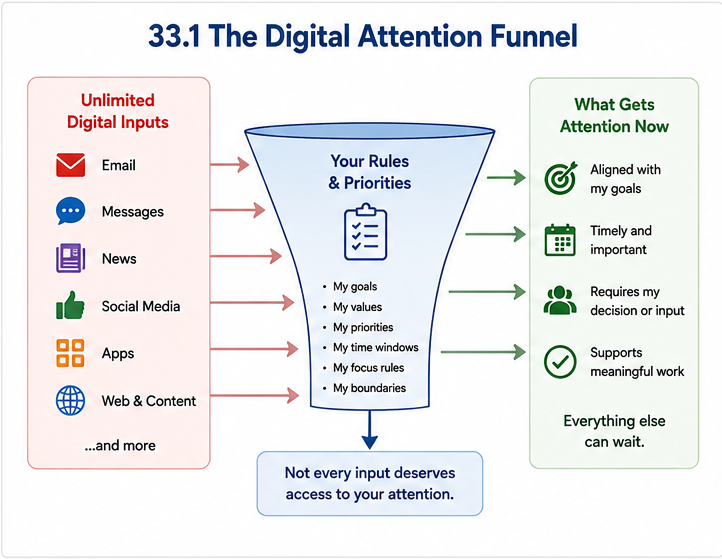
Not Every Digital Input Deserves Immediate Attention
A notification creates a sense that something has happened now.
That does not mean you need to deal with it now.
An email can arrive at 10:17 and remain completely useful when you read it at 11:30.
A message in a project channel may require action today without requiring action during the next sixty seconds.
Separate two concepts:
- Arrival time: when information reaches your system.
- Processing time: when you choose to give it attention.
When these two become automatically connected, other people and applications gain control over your schedule.
When they are separated, communication becomes an input that you process deliberately.
Notifications Should Be the Exception
Notifications are useful when the timing of the information matters.
For example:
- a meeting is about to begin;
- a person you are waiting for has arrived;
- a security warning requires attention;
- an important system has failed;
- there is a genuine operational emergency.
But many notifications simply announce that new information exists.
You rarely need your phone to interrupt you because:
- someone liked a post;
- a retailer has a promotion;
- a news site published another article;
- a new email entered your inbox;
- someone posted something in a non-urgent group;
- an application wants you to return to it.
A useful default is:
Allow interruptions only from channels where immediate timing creates genuine value.
Everything else can wait until you intentionally check it.
Example 33.1 — Nothing Interrupted Laura for More Than 30 Seconds
Laura says that notifications do not bother her because she usually looks at them for only a few seconds.
During one morning she receives:
- eight email notifications;
- six Teams notifications;
- three WhatsApp messages;
- two news alerts;
- four miscellaneous phone notifications.
No individual interruption is long.
But each one creates a decision:
Should I look? Should I answer? Is this important? Can it wait?
Laura changes her settings so that only calls from selected contacts and calendar reminders can interrupt her focus periods. Email and Teams remain available, but she has to open them intentionally.
The total number of messages does not change.
Who controls the timing changes.
Batch Communication Instead of Living in the Inbox
Email and messaging are essential tools, but continuous checking turns asynchronous communication into a stream of interruptions.
Unless your role requires immediate response, process communication in deliberate windows.
For example:
- 10:30 — email and messages;
- 13:30 — quick communication check;
- 16:30 — final processing and follow-up.
The right frequency depends on your role.
A customer-support specialist may need much faster response than a researcher writing a report.
The principle is therefore not “check email only twice a day.”
The principle is:
Choose a response rhythm that meets real requirements without making every incoming message an interruption.
Create a Real Urgent Channel
People often keep every communication channel open because they are afraid of missing something genuinely urgent.
A better solution is to define what people should do when something genuinely cannot wait.
For example:
Routine: email or project tool.
Needs an answer today: Teams or Slack message.
Urgent and cannot wait: call.
Your system may be different. The specific channels matter less than the distinction.
If everything is urgent, you cannot protect attention.
If people know how to reach you in a real emergency, you can safely ignore routine communication for longer periods.
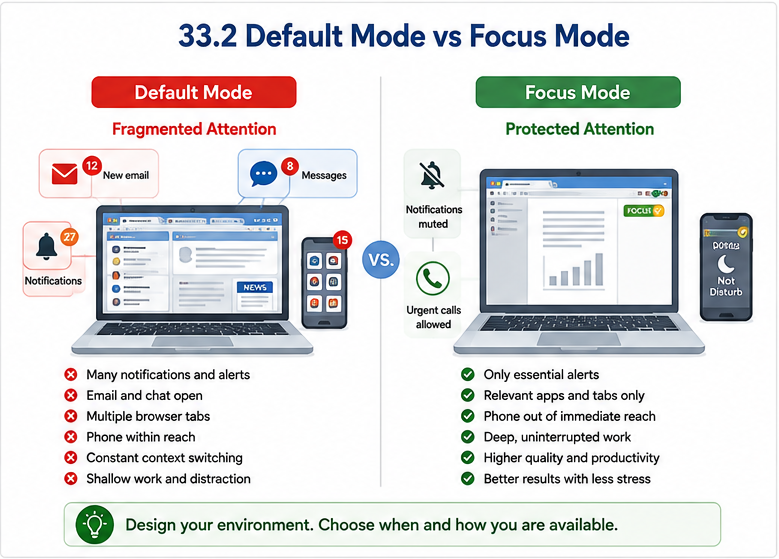
Design Focus Mode Before You Need It
Do not spend the first ten minutes of every focus session closing applications and adjusting settings.
Create a reusable focus configuration.
It might automatically:
- silence most notifications;
- allow calls only from selected people;
- hide notification badges;
- change your status to unavailable;
- remove distracting applications from immediate view;
- limit access to selected websites;
- keep only the applications needed for the current work visible.
The easier focus mode is to activate, the more likely you are to use it.
You can create different modes for different situations:
- Deep Work;
- Meeting;
- Personal Time;
- Sleep;
- Travel.
The purpose is not to make your device complicated.
It is to make the desired environment easy to activate.
Add Friction to Unwanted Digital Behaviour
Many digital distractions happen almost automatically.
You finish one difficult paragraph and your hand reaches for the phone.
You open a browser to find one fact and type the address of a news site instead.
You intend to check one social-media message and begin scrolling.
Do not rely only on willpower.
Change the environment.
Possible ways to add useful friction include:
- remove distracting applications from the home screen;
- log out after use;
- disable automatic login;
- use website or application blockers during focus periods;
- keep the phone outside immediate reach;
- turn the phone face down or place it in a drawer;
- remove shortcuts to distracting sites;
- use a separate browser profile for focused work.
A five-second barrier may be enough to interrupt an automatic habit and force a conscious decision.
Friction works in both directions.
Make distractions slightly harder.
Make desired actions slightly easier.
For example, keep the document you need to write open and ready while distracting applications require several steps to access.
Your Phone Does Not Need to Be Beside You
A smartphone is useful partly because it is always available.
That does not mean it must always be within arm’s reach.
During concentration-heavy work, consider putting it:
- in a bag;
- in a drawer;
- on the other side of the room;
- in another room;
- in a designated charging location.
This removes one easy escape route when the task becomes uncomfortable.
You can still use the phone when you decide to use it.
The difference is that checking becomes intentional rather than automatic.
Be Especially Careful with the Browser
The web is often both the place where work happens and the place where work disappears.
You may genuinely need a browser for research, cloud applications, documents, communication, and AI tools.
But every browser tab also creates another possible direction for attention.
For demanding work:
- close tabs you do not currently need;
- bookmark material for later instead of leaving it open indefinitely;
- separate work and personal browser profiles where useful;
- capture interesting but irrelevant links instead of reading them immediately;
- search with a clear question rather than browsing without a defined objective.
When you discover something interesting during work, ask:
“Does this help me complete the task I am working on now?”
If not, save it for later.
Separate Intentional Entertainment from Accidental Consumption
Digital entertainment is not automatically wasted time.
Watching a film, playing a game, following a sport, talking with friends, or browsing something interesting may be exactly how you want to spend part of your leisure time.
The problem is accidental consumption.
You intended to spend five minutes but stayed for forty.
You opened a platform without deciding what you wanted from it.
You continued consuming content long after it stopped being enjoyable.
A useful distinction is:
- Intentional use: “I am going to watch this episode.”
- Open-ended use: “I will just see what’s there.”
The second is much more likely to expand unexpectedly.
Example 33.2 — The Five-Minute Break
Martin has been working on a difficult spreadsheet for forty minutes.
He decides to take a short break and opens a social-media application.
One post leads to another. Then he watches a short video. Then another appears automatically.
Twenty-two minutes later he returns to the spreadsheet.
Martin changes his break routine.
Short work breaks now mean getting away from the screen: water, movement, looking outside, or simply sitting for a few minutes.
He still uses social media later in the evening.
The goal was not to remove entertainment. It was to stop an open-ended digital activity from replacing a short recovery break.
Capture Curiosity Instead of Following It
Not every distraction comes from another person or application.
Your own mind produces interruptions:
- “I should check the weather.”
- “What time does that restaurant close?”
- “I wonder what happened in yesterday’s match.”
- “I should order that cable.”
- “I just remembered an email I need to send.”
If you follow every thought immediately, concentration becomes impossible.
Keep a small capture area beside you.
When an unrelated thought appears, write it down and continue working.
This tells your brain:
“I do not need to act on this now, and I do not need to remember it.”
Protect the Beginning of a Focus Session
The first few minutes of demanding work can feel uncomfortable.
You may not yet know how to solve the problem. The document may feel difficult. Progress is still invisible.
This is exactly when digital escape is attractive.
Avoid beginning an important focus block by checking:
- email;
- messages;
- news;
- social media;
- analytics;
- other low-priority dashboards.
Start with the work.
You can process communication later.
Protect the End of the Day Too
Digital attention management is not only about work productivity.
Work applications can extend the working day into personal time.
A message checked at 21:30 may require only thirty seconds to read but keep the problem in your mind for the rest of the evening.
Consider creating an end-of-day boundary:
- close work applications;
- disable work notifications;
- use a separate work profile;
- leave the work phone in a specific place;
- define when you will next check work communication.
The ability to receive work communication at any time does not create an obligation to give it attention at any time.
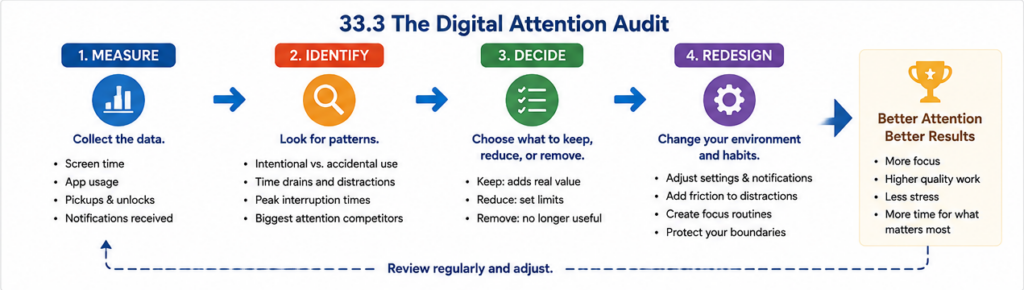
Use Screen-Time Data as Evidence, Not Judgment
Modern devices can often show:
- how much time you spend in applications;
- how often you pick up or unlock the phone;
- how many notifications you receive;
- which applications consume the most attention.
This information can be useful because perception is unreliable.
You may believe that you “hardly use” an application and discover that short visits add up to several hours during the week.
Use the data diagnostically.
Ask:
- Which use was intentional?
- Which use surprised me?
- Which applications repeatedly interrupt work?
- Which behaviour do I actually want to change?
The goal is not to reduce every screen-time number.
Three hours spent writing, designing, learning, or communicating meaningfully is different from three hours of consumption you did not intend.
Do Not Optimize Attention into Isolation
Attention protection has limits.
If your work depends on customers, colleagues, students, patients, or team members, complete isolation may damage performance rather than improve it.
The objective is not to become unreachable.
It is to distinguish:
- when you need to be available;
- how quickly different types of communication require response;
- when uninterrupted work creates more value.
A strong digital-attention system protects concentration while preserving necessary communication.
Example 33.3 — The Manager Who Turned Everything Off
Daniel learns about deep work and turns off almost every communication channel for most of the day.
His concentration improves.
But Daniel manages a team that regularly needs decisions from him. Work begins waiting for his responses.
He redesigns the system.
- 09:00–10:30 — protected focus;
- 10:30–11:00 — messages and decisions;
- 13:00–14:00 — meetings and availability;
- 14:00–15:30 — second focus period;
- urgent operational issues can reach him by phone.
Daniel does not maximize uninterrupted time.
He creates the amount of uninterrupted time that is compatible with his role.
Build a Digital Attention Protocol
Instead of making hundreds of small decisions throughout the day, create a few default rules.
For example:
- Email is checked at defined times unless the role requires faster processing.
- Non-essential notifications are disabled.
- Focus mode is activated during demanding work.
- The phone is kept away from the desk during deep work.
- Interesting but irrelevant information is captured for later.
- Short breaks are usually screen-free.
- Work notifications stop after the working day.
- Genuine emergencies have a clearly defined channel.
Your protocol should fit your responsibilities.
It should reduce unnecessary decisions without preventing you from changing the rules when circumstances genuinely require it.
Exercise 33.1 — Notification Audit
Open the notification settings on your phone and main work device.
For each application, classify notifications as:
- Immediate: timing genuinely matters.
- Useful but not immediate: I want the information, but I can check it later.
- Unnecessary: this application does not need permission to interrupt me.
Disable at least five unnecessary sources of interruption.
Then ask whether the remaining notifications need sound, vibration, badges, banners, or merely passive visibility.
Exercise 33.2 — Run a Three-Day Digital Attention Experiment
For three working days, choose one daily period of at least 60 minutes.
During that period:
- activate Do Not Disturb or Focus mode;
- close email and messaging applications;
- keep the phone out of immediate reach;
- close irrelevant browser tabs;
- capture unrelated thoughts instead of following them.
At the end of each session record:
- What did you complete?
- How difficult was it to stay focused?
- What tempted you to leave the task?
- Did anything genuinely urgent get missed?
Use the evidence to decide whether and how to continue the practice.
Exercise 33.3 — Write Your Digital Attention Rules
Create six to ten personal rules.
Complete statements such as:
- Email: I normally check it ______.
- Messaging: My expected response pattern is ______.
- Urgent communication: People should ______.
- Focus work: My phone will be ______.
- Notifications: I allow ______.
- Social media: I use it intentionally by ______.
- Work after hours: My boundary is ______.
- Interesting distractions: I capture them in ______.
Keep the rules simple enough that you can actually follow them.
Make Attention a Deliberate Choice
Digital technology is not the enemy of productivity.
Much of modern knowledge work would be impossible without it.
The problem appears when every application, message, notification, recommendation, and curiosity receives permission to compete for your attention at any moment.
You do not need perfect discipline.
You need better defaults.
Reduce unnecessary alerts. Separate arrival from processing. Create clear urgent channels. Protect focus periods. Add friction to automatic distractions. Measure your real habits occasionally. Protect personal time from work communication.
Most importantly, stop treating every new digital input as a new priority.
Your attention should follow your priorities—not whichever application asks for it next.
Key Takeaways
- Digital attention management is about controlling what receives your limited attention and when.
- More information is available than you could ever consume, so selective attention is unavoidable.
- Separate the arrival of information from the time when you process it.
- Not every message or notification requires an immediate response.
- Notifications are most useful when the timing of the information genuinely matters.
- Batch asynchronous communication where your role allows it.
- Define a genuine urgent channel so routine communication can wait.
- Create reusable Focus or Do Not Disturb modes for demanding work.
- Use environmental design instead of relying only on willpower.
- Add friction to distracting behaviours and remove friction from important work.
- Your phone does not need to remain within immediate reach during concentration-heavy work.
- Keep browser tabs and digital inputs relevant to the task you are actually performing.
- Distinguish intentional leisure from open-ended accidental consumption.
- Capture unrelated thoughts and interesting links instead of immediately following them.
- Screen-time and notification data can reveal attention patterns that memory misses.
- The objective is not complete isolation; availability should match the requirements of your role.
- Protect personal time from unnecessary work-related digital inputs.
- Create a small set of default digital-attention rules instead of making the same decisions repeatedly.
- Digital technology should serve your priorities rather than determine them.
Want the full system?
This was one chapter from the Modern Time Management e-course.
The full course includes 40 practical chapters across six modules, covering priorities, planning, focus, communication, energy management, digital productivity, AI, automation, and building your personal productivity system.
You will also get practical exercises, examples, visual frameworks, and ready-to-use methods you can apply directly to your own work and daily routines.
Launch price: €59
Regular price: € 79